
As an Amazon Associate, we earn from qualifying purchases. This post contains affiliate links – if you buy through them, we may earn a commission at no extra cost to you.
Most people looking for the best heat sink material are really choosing between a few types of metal and a few ways to attach them. The real difference comes down to what you’re cooling, how much room you have, and whether you need a glue, a tape or a paste to hold it. Those choices matter far more than any single metal claim.
Best overall: Heatsink Kit 40mm Aluminium. It comes with two anodized aluminum pieces and a pre-applied thermal tape backing, so you can stick it on and go.
Best for a large surface: Large Aluminum Heatsink 120mm. Its 22 fins give a big cooling area for a bigger part.
Best for a small board: Heatsink Kit 100x50mm. It’s thin and light, which suits tight spaces.
This guide is for anyone who wants a clear pick and a plain reason for it.
How We Picked
We looked at the Amazon listings for these products and chose the picks from them. To earn a place, a listing had to state its size and what was included, and it had to say what the product is meant to cool. Any product that gave too little information was left out, because a heatsink is only useful if you can confirm it will fit the part you’re cooling.
Size mattered most. A listing that gave dimensions in millimeters or inches, with length, width and height, was far easier to check against your component than one that gave only a general description. The picks are the listings that spelled out those numbers clearly, so you can compare them directly against what you have.
We also looked at what each product was meant to cool. Some listings name specific parts, such as MOSFETs, voltage regulators, or M.2 SSDs, while others are broader. A listing that said what it was built for gave us a clearer picture of whether it would suit a given job, and that clarity counted in its favor.
Included parts were the third check. Some kits come with thermal tape already attached, some include a separate adhesive, and some ship bare metal with nothing to fix it in place. We noted what each listing actually delivered, so you know whether you’ll need to buy anything extra before the heatsink can do its job.
Comparison Table
All 10 products side by side — scroll sideways to see every column.
| Top Pick | Best for Power Parts | Best for Long Boards | Best for Routers | Best for SSDs | Best for Thin Spaces | Best for Permanent Bonding | ||||
| Preview |  |  |  | 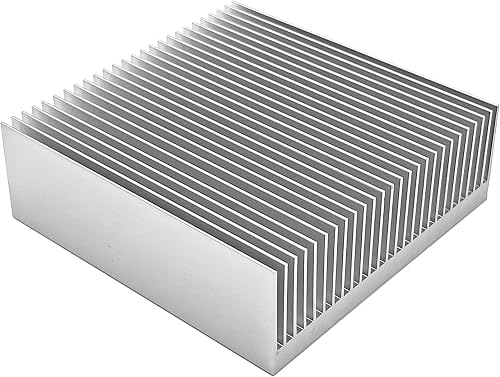 |  |  |  |  |  |  |
|---|---|---|---|---|---|---|---|---|---|---|
| Product | Heatsink Kit 40mm Aluminium | Large Aluminum Heatsink 120mm | Aluminum Large Heatsink 11.8in | Aluminum Heat Sink 80mm | Black Large Heatsink 70mm | M.2 Heatsink Cooler 2280 | Heatsink Kit 100x50mm | uxcell Aluminum Heat Sink | Super Lube Silicone Heat Sink | Silicone Thermal Conductive Adhesive |
| Brand | Easycargo | Awxlumv | Tyenaza | Awxlumv | Awxlumv | SGTKJSJS | Awxlumv | uxcell | Super Lube | Easycargo |
| Best for | Top Pick | Best for Power Parts | Best for Long Boards | Best for Routers | — | Best for SSDs | Best for Thin Spaces | — | — | Best for Permanent Bonding |
| The listing says | 2 black anodized aluminum heatsink pieces Pre-applied thermal adhesive tape backing | Black anodized aluminum, 22 fins 120 x 69 x 27 mm (L x W x H) | Larger fin area for greater heat transfer For LED lights, audio amplifiers and power supplies | 6063-T5 aluminum alloy, anodized finish 80 x 80 x 27 mm, standard universal size | 70 mm anodized aluminum heatsink Pre-coated thermal tape backing | Fits Samsung 860/960/970/980 EVO and PS5 Aluminum alloy with silver plating | 50 mm anodized aluminum thin heatsink Pre-applied thermal adhesive tape backing | High-quality aluminum, good thermal conductivity 8 fins for a larger heat dissipation area | Silicone heat sink compound for CPUs and LEDs Non-curing, stays flexible over time | Silicone-based thermal glue, high conductivity Non-conductive and non-corrosive, safe for PCBs |
| More information | Price on Amazon | Price on Amazon | Price on Amazon | Price on Amazon | Price on Amazon | Price on Amazon | Price on Amazon | Price on Amazon | Price on Amazon | Price on Amazon |
1. 2pcs 40mm Heatsink Kit 100mmx40mmx20mm + 3M8810 Thermal Conductive Adhesive
Best for: Hobbyists cooling a motor, Peltier cooler or water block.
This kit has two black anodized aluminum pieces, each measuring 100mm by 40mm by 20mm. The backing already has thermal tape on it, so you skip the step of buying a separate adhesive. That makes it a good first choice for a quick build.
The size is compact, and each piece weighs about 75 grams. A lighter part is easier to mount on a small frame, though a heavier one may hold its heat better. This kit is less suited to someone who needs a large cooling surface, since the pieces are fairly small. A larger fin stack, like the 120mm option below, would serve that job better.
Pros
- Two pieces in one kit
- Tape already applied
- Lists use with motors and Peltier coolers
Cons
- Small cooling surface for big parts
2. Large Aluminum Heatsink 4.72”x2.72”x1.06” inch /120x69x27mm Heat Sink Cooling Black
Best for: Anyone cooling a larger power part, such as an amplifier or power supply.
This heatsink measures 120mm by 69mm by 27mm and has 22 fins in black. The fins give it a wide cooling area compared with the smaller kits. A wider surface lets more heat leave the metal into the air, and the 27mm height adds more fin surface for that job.
Before you buy, measure the space around the part you want to cool. The listed size is the full footprint, so check that the heatsink will fit without touching nearby components, cables or the case wall. A part that sits in an open area is a much easier fit than one tucked into a crowded board.
The bigger body also means more weight to support, and it needs enough room to sit flat. Make sure the mounting surface is flat and firm enough to carry that weight without flexing. If your part is small, this is more than you need. The 3.9mm-thick version in the kit above would be a better fit for a tight spot.
Pros
- 22 fins for a large cooling area
- Black oxide finish
- Listed for many device types
Cons
- Bulky for small builds
3. Aluminum Large Heatsink 11.8in
Best for: Builders with a long board or an LED array that needs room to spread heat.
This piece is 300mm by 140mm by 20mm and has 19 fins. Its long 300mm by 140mm footprint gives a wide base for a larger part. The listing says it’s made from aluminum alloy.
Because it’s so large, it needs a lot of mounting space. A pick like the 80mm model below is easier to fit on a small board. The size is also listed in inches and millimeters, so check the dimensions against your part before ordering.
Pros
- Long shape covers a wide area
- 19 fins
- Made from aluminum alloy
Cons
- Needs a lot of mounting space
4. 80mm Aluminum Heat Sink 80x80x27mm /3.15″x3.15″x1.06″ Large Heatsink Sync Circuit
Best for: Routers, chips and other small electronics.
KEEP.
It’s a good middle size for common electronic parts. Its weight is noticeably higher than the smaller kits, so a light mounting method is important. Fins add surface area, which is why a sink this size can move heat away from a part without needing a fan, as long as the air around it can circulate freely.
Think about where the part sits before you buy. The fins only do their job if air can reach them, so a sink tucked inside a tight, closed enclosure will perform much less well than one in open air. Check the spacing around the board as well as the sink’s footprint.
The listing says the sink fits most 80mm fans, but the fan isn’t included. If your device runs hot under load, a fan is the usual next step. Confirm the fan’s mounting holes line up with the fins before you order it, because the listing doesn’t show how a fan attaches.
Pros
- 26 fins for a large surface
- 6063-T5 aluminum alloy
- Suits many electronic parts
Cons
- Heavier than the smaller kits
- Fan not included
5. 2PCS Black Large Heatsink Aluminum Heat Sink with Thermal Conductive
Best for: Power supplies, hard disks and Peltier modules that run hot.
This is a 70mm by 70mm by 15mm anodized aluminum heatsink, sold as a two-pack. It comes with thermal tape already on the back, so you can stick it on without adding a separate adhesive. Each piece weighs about 80 grams.
The listing says the fins are designed to maximize the surface area in contact with the cool air. That’s the reason a heatsink like this works: it spreads heat from the part into the surrounding air, and more exposed surface means more heat leaves the metal. This is passive cooling, so it relies on airflow the device already has rather than on a fan.
The thickness of 15mm is moderate, so it fits many spots. Before you put it on, check that the part sits flat against the tape, because a gap between the two will cut the heat transfer. Since the listing doesn’t state a maximum temperature, check your part’s rating before you rely on it.
Who should look elsewhere: if your part sits in a space with little airflow, passive cooling may not be enough, and a fan-cooled option or a different size would serve you better.
Pros
- Pack with tape applied
- Anodized aluminum
- Suits high-power parts
Cons
- Heavier than the thinnest kit
6. M.2 Heatsink Cooler 2280
Best for: Anyone who wants to cool an M.2 SSD in a desktop PC or a PS5.
This cooler is made from silver-plated aluminum alloy with an anodized surface. It measures about 3 by 0.95 by 0.4 inches. It has double-sided clips and thermal pads, so it fits M.2 drives of different heights.
The listing says the cooler is designed for single-sided M.2 SSDs. If your drive has chips on both sides, check before you buy, because this design is meant for the single-sided type.
The thermal pads are described as having good thermal conductivity and low viscosity, and the listing says they won’t damage the M.2 SSD. The clips hold the cooler in place, so the pads stay in contact with the drive.
KEEP. Treat that range as a general expectation, not a guarantee for your setup.
It’s built for one job, so it won’t help with other parts. The listing names several SSD models it fits, which helps you check compatibility before buying.
Pros
- Built for M.2 2280 drives
- Double-sided clip design
- Thermal pads included
Cons
- Only fits M.2 drives
7. Heatsink Kit 100x50mm
Best for: Thin mounting spaces, such as a motor or a Peltier cooler.
This kit has two anodized aluminum heatsinks, each 100mm by 50mm by 4mm. The thin profile is its main feature, and it’s what makes the kit fit where a thicker block would not. The listing gives no weight for each piece.
The thin shape gives less fin area than the thicker blocks, so it moves less heat in a given space. That’s the trade-off to weigh. If the part you’re cooling runs very hot, or if you have room for more height, a thicker block will do the job better. Choose this kit when clearance is the limit and the heat load is modest.
The pre-applied thermal tape on the back is the practical advantage. You peel off the liner and press the piece into place, so there’s no separate adhesive to measure or cure. Check that the surface is clean and flat before you press it down, because the tape grips best on a smooth, dry surface.
Pros
- Very thin profile
- Light weight
- Tape already applied
Cons
- Less fin area than thicker blocks
8. uxcell 5 Pcs Aluminum Heat Sink
Best for: Buyers who want several heatsinks in one pack.
Five silver-tone aluminum heatsinks come in this pack, each 100mm by 25mm by 10mm. The listing says each piece has eight fins, and the net weight for the whole pack is 6.1 ounces.
Aluminum is the main reason these work. Each fin adds surface area that touches the cooling air, so the eight fins on each piece are what carry heat away from the component. That’s why the fin count matters more than the bare size of the block.
Getting several pieces in one pack is the main advantage. You can put one on each of several chips or modules in the same project, instead of buying a separate kit for each one. The listing names a wide range of parts these can be used with, including LED devices, power transistors, FETs, ICs, power amplifiers, voltage regulators and MOSFETs.
Check the fit before you commit. A 100mm by 25mm footprint is large, so if your part is smaller or the space around it’s tight, one of the smaller heatsinks on this list will suit you better. The listing doesn’t state a maximum temperature or a warranty, so check those details yourself before ordering.
Pros
- A multi-piece pack
- Compact size
- Lightweight
Cons
- Eight fins give a modest surface
9. Super Lube Silicone Heat Sink Compound
Best for: Anyone who needs a thermal compound between a chip and a heatsink.
This is a white, non-curing silicone compound in a three-ounce tube. The listing says it has high dielectric strength, which means it resists electrical current. It is described as non-curing, so it stays soft in use.
A compound is a different product from the heatsinks above, so it works with them rather than replacing them. KEEP. Filling them with a thermally conductive paste lets heat move more easily from the chip into the heatsink.
The listing describes the compound as adhering smoothly to metal surfaces and filling imperfections with ease. That makes it a natural fit for uneven or slightly rough contact points, where a flat heatsink would otherwise leave air pockets.
The listing says it can be wiped off, which makes disassembly easier. It doesn’t bond parts together. If you later need to remove the heatsink, you can clean the compound off without damaging the parts underneath.
Pros
- High dielectric strength
- Easy to remove
Cons
- Needs a heatsink to work with
10. Silicone Thermal Conductive Adhesive
Best for: Permanent bonding of heatsinks to chips, GPUs and transistors.
It’s meant to stay bonded at high temperatures, so it suits parts that run hot for long periods and need a bond that holds.
The glue is also described as a structural bond that replaces messy paste. That means the heatsink is held in place by the adhesive itself, not by clips or tape.
Because it’s a permanent glue, removing a heatsink later can be hard. If you may need to change parts, the tape-backed kits above are easier to take off. This glue suits builds that won’t be opened again, such as a finished 3D printer or a Peltier module you don’t plan to service.
Before you commit, check which parts you’re bonding and whether you’ll ever need access to them. If the answer is that you might upgrade or repair the hardware, a removable option is the safer choice.
Pros
- Non-conductive and non-corrosive
- Stays bonded at high temperatures
- Suits many chip types
Cons
- Hard to remove later
How to Choose in Sixty Seconds
Match the size to your part
Measure the surface you need to cool before you buy. A heatsink larger than the part won’t sit flat, and one smaller than the part will cool less. Check the listed dimensions in millimeters against your own measurements.
Decide between tape and glue
Tape-backed kits are quick to fit and easy to remove. Glue is permanent and harder to undo. Pick tape if you may open the device later, and glue only if the bond must stay put.
Confirm the fit before ordering
Some listings say which devices they fit, and some do not. For an SSD or a fan, read the compatibility list before buying. A part that doesn’t fit is a waste of money whatever the metal.
Frequently Asked Questions
Is aluminum the best heat sink material?
Aluminum is the material used in every heatsink in this list, and the listings describe it as a good conductor of heat. It’s common because it’s light. For most hobby and electronics jobs, it’s a sound choice. The listings don’t compare it with other metals, so the claim that it’s the best rests on its common use rather than on a test shown here.
Do I need thermal paste or glue with a heatsink?
Many heatsinks need a thin layer of thermal compound or tape between the metal and the part. The Super Lube compound is a paste that stays flexible and can be removed later. The silicone glue bonds the parts for good. The tape-backed kits skip the separate step. Choose the one that matches how often you may open the device.
Which size should I pick for a small board?
For a small board, the 100mm by 50mm kit or the 40mm kit fits better than the big blocks. The thin 4mm profile of the 100x50mm kit suits tight spaces. Measure the board and the mounting room first, then compare the dimensions in the listings.
Does a heatsink need a fan?
Some heatsinks work on their own, while others need airflow to do their best. The 80mm model is listed as compatible with 80mm fans, but the fan isn’t included. Check whether your part is cooled by moving air before you decide. If it is, buy a fan that matches the heatsink size.
Closing
Its pieces measure 100mm x 40mm x 20mm, so it works best where a long, low-profile surface is what you need. If you’re cooling a part that’s much larger or has more heat to shed, the Large Aluminum Heatsink 120mm is the next choice, since it offers a bigger cooling surface with 22 fins.
Start by measuring your part, not guessing from its name. A heatsink that’s too small will leave some of the component uncovered, and one that’s too large may not sit flat. Compare the length and width of the heatsink against the contact area of your component, then choose the size that matches it. The 11.8in heatsink’s listing notes that its size should fit your component, so treat the listed dimensions as the final check before you buy.
The 40mm kit also fits a specific kind of job. Its pre-applied tape backing means you can stick it on without mixing or curing anything, which is useful for quick passive-cooling setups. If your part needs a permanent bond that holds through high temperatures, a thermal adhesive is the better route, and the choice between the two comes down to whether you need to remove the heatsink later.