
Choosing an outdoor camera with local storage means you keep your video footage at home rather than paying for monthly cloud subscriptions. The main differences between these options are how they connect to your network, whether they require a central hub, and how they handle power through solar panels or batteries.
Best overall: eufy Security eufyCam C37, which offers 360-degree coverage and expandable local storage without any mandatory cloud fees, making it a reliable choice for homeowners who want total control over their data.
Best for beginners: Tapo C400 Wireless, as it provides a straightforward, compact design that’s easy to install and supports local storage on a microSD card without needing a complex hub setup.
Best for power users: Reolink E1 Outdoor Pro, which stands out for its high-resolution 4K image quality and Wi-Fi 6 connectivity, suiting those who need sharp details and a faster, more stable network connection.
This article is for anyone looking to secure their home perimeter while keeping video files stored locally on their own hardware.
How We Picked
We compared 16 different outdoor camera listings to find the most capable models for local storage. To earn a place in this article, a product had to clearly state its storage capacity, its power source, and its specific motion-tracking capabilities. We excluded any cameras that forced users into mandatory monthly subscriptions to access basic features or local recording functions. Our selection focuses on the hardware specifications provided by the manufacturer, ensuring that every recommendation is based on the features the user actually receives in the box.
All 10 products side by side — scroll sideways to see every column.
| Top Pick | Best for 4K Video | Best for Dual Views | Best for Solar Power | Best for Hub Kits | Best for Auto Tracking | Best for Entry Points | Best for Rentals | Best for 5G Networks | ||
| Preview |  |  |  |  |  | 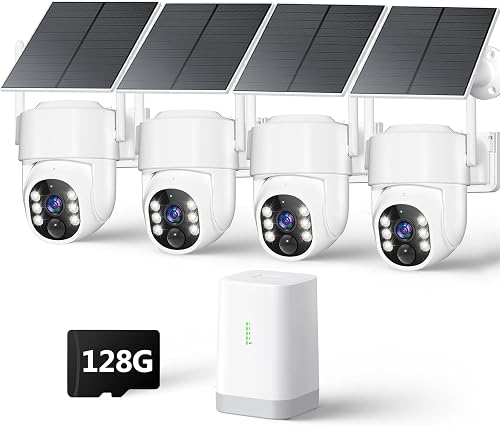 |  | 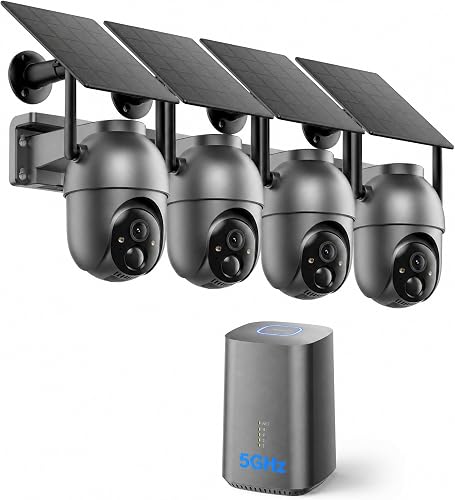 |  |  |
|---|---|---|---|---|---|---|---|---|---|---|
| Product | eufy Security eufyCam C37 | Reolink E1 Outdoor Pro | aosu T2 Pro | eufy Security SoloCam E30 | No Monthly Fee System | 4MP Wireless PTZ Camera | Tapo C400 Wireless | SEHMUA Wireless Kit | eufy Security C35 | Wireless 5G Solar Camera |
| Brand | eufy Security | REOLINK | aosu | eufy Security | Carltec | Vivideye | Tapo | SEHMUA | eufy Security | Vivideye |
| Best for | Best Overall | Best for 4K Video | Best for Dual Views | Best for Solar Power | Best for Hub Kits | Best for Auto Tracking | Best for Entry Points | — | Best for Rentals | Best for 5G Networks |
| The listing says | 360° pan and tilt coverage No monthly subscription fees | 4K resolution with 3X optical zoom Wi-Fi 6 with 2.4/5GHz support | Dual-camera design with 170° wide angle Auto-tracking with lock-capture technology | 360° field of view 2K resolution with f/1.6 aperture | Local storage up to 128GB 360° PTZ with AI auto tracking | Built-in 128GB local storage 4MP resolution with 65ft night vision | 1080P Full HD with color night vision Suitable for outdoor entry points | Local storage up to 256GB Ethernet connection for stable performance | [Magnetic base for easy mounting](https://hometeat.com/best-magnetic-security-camera/) Color night vision without spotlights | Built-in 128GB local storage 360° auto-tracking with cross-camera follow |
| More information | Check Latest Price on Amazon | Check Latest Price on Amazon | Check Latest Price on Amazon | Check Latest Price on Amazon | Check Latest Price on Amazon | Check Latest Price on Amazon | Check Latest Price on Amazon | Check Latest Price on Amazon | Check Latest Price on Amazon | Check Latest Price on Amazon |
1. eufy Security eufyCam C37 4-Cam Kit
Best for: Property owners needing comprehensive 360-degree visibility.
The eufy Security eufyCam C37 uses pan and tilt technology to cover large areas, effectively removing blind spots. It includes a detachable solar panel that ensures the battery stays charged without manual intervention, provided it receives sufficient sunlight.
This camera records in 2K resolution, which captures more detail than standard 1080p models. It requires a compatible HomeBase for operation, which acts as the central point for your local storage and AI features like facial recognition.
- Pros:
- 360-degree pan and tilt coverage.
- Zero monthly subscription fees required.
- Expandable storage up to 1TB.
- Cons:
- Requires specific HomeBase hardware.
- Not compatible with HomeKit.
2. REOLINK E1 Outdoor Pro 4K PTZ Outdoor Security Camera WiFi
Best for: Users who prioritize high-definition 4K video.
The Reolink E1 Outdoor Pro features 4K resolution and 3X optical zoom, allowing you to see fine details from a distance. It supports Wi-Fi 6, which helps maintain a stable connection even in busy network environments. By utilizing both 2.4 GHz and 5 GHz frequencies, the camera ensures consistent performance across your home network.
The camera provides a 355° pan and 50° tilt range to cover wide areas. Its smart technology distinguishes between person and vehicle shapes, providing instant alerts for relevant movement. You should use the motion zone and schedule settings to limit monitoring to specific entry points, which prevents unnecessary notifications from high-traffic areas like public streets.
For outdoor use, the camera must be installed upside down to maintain its certified waterproof rating. If you’re mounting the device in an exposed area, verify this orientation to prevent moisture damage. The unit is backed by a 2-year limited warranty, covering quality issues that may arise during standard operation.
- Pros:
- Sharp 4K resolution clarity.
- Supports faster Wi-Fi 6 networks.
- Includes a 2-year limited warranty.
- Cons:
- Must be installed upside down.
- Requires a plug-in power source.
3. aosu T2 Pro 3K Dual Cam Outdoor Security Camera
Best for: Those needing both wide-angle and zoomed views.
The aosu T2 Pro uses a dual-camera design, with one fixed 170° lens for a wide overview and a second 360° PTZ lens that follows specific movement. This setup allows you to see the big picture while automatically tracking subjects for close-up details. If you need to inspect a specific spot, tap anywhere on the wide-angle view in the app to instantly move the PTZ camera to that area.
The system is powered by a 5W solar panel and a 9200mAh battery. It stays charged with as little as 90 minutes of direct sunlight per day. If your installation site receives less than this, you should consider moving the detachable panel to a location with better exposure.
On-device AI allows you to draw virtual boundaries around driveways or fences. Use these zones to filter out background motion and receive alerts only when movement crosses your chosen perimeter.
- Pros:
- Dual-lens system for better coverage.
- Integrated solar panel power.
- Customizable AI monitoring zones.
- Cons:
- MicroSD card isn’t included.
- Only supports 2.4 GHz Wi-Fi.
- Requires 90 minutes of daily sun for consistent power.
4. eufy Security SoloCam E30
Best for: Homeowners wanting a simple solar-powered setup.
The eufy Security SoloCam E30 is built for continuous outdoor use with its removable solar panel and 2K resolution. With just two hours of daily sunlight, the SolarPlus technology keeps the battery charged indefinitely. It tracks people and vehicles automatically, which helps reduce false alerts from things like swaying trees or pets.
The f/1.6 aperture ensures sharp images in varying light conditions. You can store your footage locally on a microSD card up to 128 GB, avoiding monthly subscription fees entirely. If you need more capacity, pair the unit with a HomeBase S380 for TB-scale storage or an S280 for group control. Always unbind your device before switching between these base stations to avoid connection errors.
This camera isn’t for users who need 5GHz Wi-Fi, as it strictly requires a 2.4GHz network for wireless performance. Ensure your router is set to this frequency to maintain a stable signal.
- Pros:
- Continuous charging via solar panel.
- No monthly subscription fees.
- Supports up to 128GB local storage.
- Cons:
- Only supports standard-range Wi-Fi networks rather than high-speed bands.
- MicroSD card sold separately.
5. No Monthly Fee System
Best for: Users who want a complete hub-based kit.
The No Monthly Fee System by Carltec comes as a two-pack, providing an immediate way to cover two sides of a house. The central hub manages storage for all connected cameras, ensuring your data stays safe even if an outdoor unit is stolen or broken. You must purchase a 128GB SD card separately to enable this loop recording.
The hub supports up to four cameras. If your property requires more than four units, you must buy an additional hub, as the system can’t link more cameras to a single base. Ensure your home has a stable dual-band Wi-Fi connection, as these cameras can’t function without a network and don’t support 4G/LTE cellular cards.
- Pros:
- Dual-band Wi-Fi connectivity reduces lag.
- Rugged IP66 casing withstands extreme weather.
- Hub-based local storage keeps footage private.
- Cons:
- Hub capacity limited to four cameras.
- SD card not included in the box.
- Requires consistent Wi-Fi; no cellular backup.
6. 4MP Security Cameras Wireless Outdoor
Best for: Those who need PTZ auto-tracking.
The 4MP Wireless PTZ Camera by Vivideye is a kit that includes a base station for secure, encrypted local storage. It’s designed for easy installation, as the cameras are pre-paired with the base station right out of the box. The 128GB hub provides three months of loop recording.
The system uses AI to detect human motion and can track subjects as they move through your yard. If you want to detect vehicles or animals, you must manually turn off the “record only when a person is detected” option in the app. Similarly, auto-tracking is disabled by default and requires manual activation.
Choose your Wi-Fi band based on your layout. Use 2.4G for a wider coverage range if the camera is far from your router, or 5G for faster speeds at shorter distances. The system is 100% wire-free, relying on an 8000mAh battery and 5W solar panel. Three hours of daily sunlight keeps it running indefinitely, even on cloudy days.
- Pros:
- Pre-paired for simple setup.
- High-resolution 4MP sensor.
- Supports dual-band Wi-Fi 6.
- Cons:
- Auto-tracking is off by default.
- Requires manual app configuration.
7. Tapo 1080p Outdoor Wireless Security Camera
Best for: A clean, minimalist outdoor aesthetic.
The Tapo C400 Wireless is a compact camera that offers a long-lasting battery life of up to 180 days on a single charge. It’s ideal for monitoring entry points or package deliveries where a large camera might be too intrusive. Because it relies on a 5200mAh rechargeable battery, you avoid messy wiring.
It integrates with Alexa and Google Assistant, allowing for voice-controlled live viewing on compatible smart screens. Note that streaming via Google is limited to Chromecast and Nest devices. It isn’t for users who need continuous power, as it lacks a solar panel. Instead, it’s built for those who prefer a set-and-forget experience.
You can store footage locally on a microSD card up to 512GB to avoid monthly fees. If you prefer off-site security, Tapo Care cloud storage is an optional alternative. The IP65 rating ensures the unit withstands rain, dust, and heat throughout the year. Use the two-way audio and custom light alarms to deter intruders directly from your phone.
- Pros:
- Long-lasting 180-day battery life.
- Compact and weather-resistant design.
- Supports large 512GB microSD cards.
- Cons:
- No solar panel included.
- Limited Google Assistant streaming options.
8. SEHMUA Security Cameras Wireless Outdoor Kit
Best for: Reliable, long-term local video storage.
The SEHMUA Wireless Kit provides a dedicated base station that keeps your video history encrypted and local. It supports up to 256GB of storage, which is useful if you have multiple cameras and want to keep weeks of footage on hand. By storing data on the 64GB Sehmuabase, you keep your files on your own hardware. Even if a camera is physically stolen or damaged, your recorded footage remains safe on the base.
The 3-meter Ethernet cable for the base station ensures a stable connection to your router, which can be a lifesaver if your Wi-Fi signal is weak in the garage or shed. If you prefer a wireless setup, the cameras themselves support dual-band Wi-Fi for flexible placement. Use the wired Ethernet connection if you need to eliminate interference for the base, but rely on the dual-band Wi-Fi for flexible camera placement.
-
Pros:
- Expandable storage up to 256GB with no monthly fees.
- Stable wired base station connection eliminates interference.
- 365-day operation via 3W solar panels.
- 4MP ultra-clear resolution with 4X zoom.
-
Cons:
- Base station requires a wired connection to the router.
- Solar efficiency depends on receiving 3 hours of direct sunlight daily.
- Requires manual configuration of detection zones to avoid false alerts from non-human movement.
9. eufy Security Indoor/Outdoor Camera C35
Best for: Rental homes or temporary installations.
The eufy Security C35 features a magnetic base that snaps onto metal surfaces, making it incredibly easy to move or adjust without drilling holes. It provides color night vision without needing a bright spotlight, which keeps your security setup more discreet. You can capture clear details like license plates or faces in total darkness without alerting intruders.
It’s a versatile option for both indoor and outdoor use. This model requires a constant power connection, so avoid placing it where a cable can’t reach an outlet. If you rely on HomeBase 2 for your current ecosystem, look elsewhere; this camera is incompatible with that hub.
You must update your eufy App to version 5.2.10_16477001 on iOS or 5.2.10_17014 on Android to ensure smooth operation. You’ll need to purchase a microSD card separately, as the device supports storage between 32 GB and 256 GB.
- Pros:
- Easy magnetic mounting system.
- Discreet color night vision.
- No monthly fees for AI.
- Cons:
- Requires a power cable.
- Not compatible with HomeBase 2.
10. Security Cameras Wireless Outdoor 5G& 2.4G
Best for: Stability in remote or weak signal areas.
The Vivideye Wireless 5G Solar Camera uses a dual-band system to maintain connectivity. If your camera is near the router, use the 5G band for faster speeds. If the camera is far away, switch to the 2.4G band for a stronger, more reliable signal.
The kit includes a 5W solar panel and an 8000mAh battery, eliminating the need for manual charging. Recordings are stored on a 128GB local hub, providing a full season of loop storage without monthly subscription fees. Even if a camera is stolen, your encrypted data remains safe on the hub.
The system features 360° auto-tracking to follow motion, but you must manually enable this feature in the Truisee App. By default, the cameras only record human motion. To capture vehicles or animals, disable the “record only when a person is detected” setting in the app.
The IP66 rating ensures the hardware survives temperatures between -4F° and 122F°. Note that this system relies entirely on your local Wi-Fi or Ethernet connection. It doesn’t support cellular 4G/LTE, so ensure your home network reaches the installation site before mounting the cameras.
How to Choose Outdoor Cameras with Local Storage
Does the camera need a hub?
Most systems with local storage use a hub or base station to manage footage securely. If you want to connect multiple cameras and see them in one app, a hub is usually the better choice. It centralizes your data, meaning that if a thief takes an outdoor camera, the video of the event is still safe inside the hub located inside your home.
However, standalone cameras like the Tapo C400 or eufy C35 are easier to set up if you only need one or two cameras. Always check if the hub is included in the box or if it must be bought separately, as this affects your total setup time. Note that some hubs have strict capacity limits; for example, the Carltec hub supports a maximum of four cameras, requiring an additional hub if you expand your system further.
Should I prioritize solar power or battery life?
Solar power is best for cameras placed in spots where you can’t easily reach them to change a battery. With a good solar panel, the camera stays charged year-round without your help. If you choose a solar model, ensure it gets at least a few hours of direct sunlight each day. The aosu T2 Pro requires as little as 90 minutes of direct sunlight, while other models like the Vivideye system suggest 3 hours.
If you can’t get enough sunlight in your chosen spot, a battery-powered camera with a long-lasting charge is a better alternative. Check the manufacturer’s estimate for battery life, but remember that high activity levels or frequent motion alerts will drain the battery faster than the “typical usage” quoted in the manual.
How much storage do I actually need?
Local storage capacity varies, but most systems support at least 64GB or 128GB via a microSD card. For most homes, 128GB is enough to store several weeks of motion-triggered events. If you have four or more cameras recording frequently, you should look for systems that support 256GB or higher to ensure you don’t overwrite older footage too quickly.
Always confirm the maximum card size the camera supports before buying a large-capacity card. For instance, the Tapo C400 supports up to 512GB, while other systems may cap out at 128GB or 256GB. Remember that local video storage ensures your privacy by keeping your recorded footage within your own property, rather than sending it to a third-party server.
Related guides
Frequently Asked Questions
What happens to my footage if the power goes out?
Most local storage cameras will stop recording if the power to your router or hub is cut, though many battery-powered cameras will continue to record motion to their internal memory or the local card until the battery dies. This ensures your security system stays online even if the lights go out.
How do I know if my Wi-Fi is strong enough?
A strong Wi-Fi signal is essential for outdoor cameras, especially those using high-resolution video. If the signal is weak, you might need a Wi-Fi extender or a mesh system to bridge the gap. Some systems, like the SEHMUA Wireless Kit, use a wired connection to the base station, which is the most reliable way to ensure you never lose a feed due to poor Wi-Fi.
Is the simplest camera on the list enough for my home?
Simple cameras like the Tapo C400 are ideal for monitoring entry points like front doors. They are easy to manage and do not require complex hub configurations. However, a single camera may not provide sufficient coverage for large properties with multiple blind spots.
What is the first thing that usually goes wrong?
Solar panels shaded by trees or buildings will fail to keep the battery charged, causing cameras to go offline. A weak Wi-Fi signal will also lead to lag or missed alerts. Ensure your camera has a clear view of the sky and a strong connection to your router.
Conclusion
The eufy Security eufyCam C37 and the Reolink E1 Outdoor Pro represent the best balance of local storage security and performance for most homes. If you want a complete system that covers your property with minimal hassle, start by checking your Wi-Fi signal strength in the areas where you plan to mount your cameras, then select the model that fits your power and coverage needs.