
Choosing the right camera for a hallway means balancing a wide field of view with the physical constraints of a narrow space. You’re deciding between cameras that use dual-lens stitching for a panoramic view and those with fisheye lenses that capture everything in a circular frame. The main differences come down to how they mount, whether they need extra wiring, and how they handle recording storage.
Best overall: Reolink 180° Panoramic, which uses dual lenses to create a seamless 180-degree view that reduces blind spots while offering simple, drill-free magnetic mounting for indoor or outdoor use. Best panoramic coverage: Reolink PoE Fisheye, which provides a full 360-degree view and uses Power-over-Ethernet for a stable connection that handles data and power through a single cable. Best offline security: Alpha Tech Indoor, which is the right choice for those who want a simple, app-free experience that records locally to a microSD card without needing any internet connection or network setup.
This guide is for those who need to monitor a hallway and want to avoid the common blind spots found in standard, narrow-angle security cameras.
How We Picked
We compared 32 different security camera listings currently available on Amazon. To earn a place in this article, a product had to clearly state its field of view, storage compatibility, and installation requirements in its official listing. We excluded any models that lacked clear specifications on power requirements or storage options, as these factors are critical for consistent hallway monitoring. Our picks focus on those that prioritize wide-angle visibility, ensuring you can see the full length of a hall from a single mounting point.
All 10 products side by side — scroll sideways to see every column.
| Top Pick | Best for PoE Networks | Best for Offline Use | Best for High Traffic | Best for Smart Tracking | Best for Patrol Monitoring | Best for Analog Systems | Best for Hikvision Users | Best for 4K Coverage | Best for People Counting | |
| Preview |  | 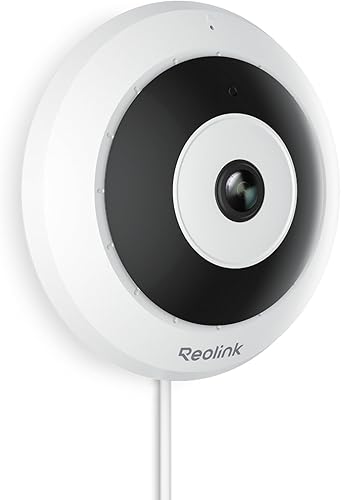 |  |  | 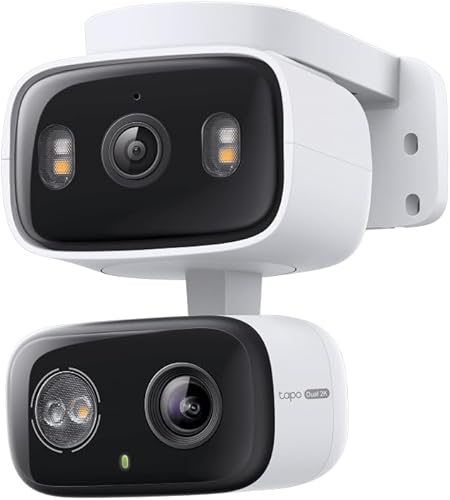 |  |  |  |  |  |
|---|---|---|---|---|---|---|---|---|---|---|
| Product | Reolink 180° Panoramic | Reolink PoE Fisheye | Alpha Tech Indoor | Vstarcam 2K Dual | Tapo 2K Dual | Wyze Duo Cam | 180 Degree Analog | 2MP Fisheye POE | Anpviz 4K Dual Lens | Amcrest Fisheye IP |
| Brand | REOLINK | REOLINK | ALPHA TECH | VSTARCAM | Tapo | WYZE | Real HD | Vonnision | Anpviz | Amcrest |
| Best for | Best Overall | Best for PoE Networks | Best for Offline Use | Best for High Traffic | Best for Smart Tracking | Best for Patrol Monitoring | Best for Analog Systems | Best for Hikvision Users | Best for 4K Coverage | Best for People Counting |
| The listing says | Dual-lens 180° panoramic view with 3K 6MP Magnetic mount for drill-free installation | 360° panoramic view with 6MP resolution Flexible installation with dewarping options | 160° wide-angle view No Wi-Fi or app required | Dual-lens with 360° PTZ and fixed lens 2K resolution with full color night vision | Dual 2K lenses with 125° FOV Fixed and pan/tilt lens coverage | Dual cameras with pan and tilt Bluetooth setup and 2.4GHz Wi-Fi | 180° wide-angle lens with 20m night vision Supports 4 video output modes | 1080P resolution with H.265 compression 1.7mm fisheye lens with 65ft night vision | 8MP 4K 180° dual-lens camera Human and vehicle detection with strobe alarm | AI tripwire, intrusion, and people counting 5MP resolution with 1.4mm fisheye lens |
| More information | Check Latest Price on Amazon | Check Latest Price on Amazon | Check Latest Price on Amazon | Check Latest Price on Amazon | Check Latest Price on Amazon | Check Latest Price on Amazon | Check Latest Price on Amazon | Check Latest Price on Amazon | Check Latest Price on Amazon | Check Latest Price on Amazon |
1. REOLINK 180° Panoramic 3K+ 6MP Magnetic Mount WiFi Outdoor Security
Best for: Homeowners wanting a wide view without complex wiring.
The Reolink 180° Panoramic uses dual lenses to stitch together a 3K 6MP image. This creates a wide field of view that’s excellent for hallways or large driveways where you need to see from one end to the other. Its magnetic mount makes it very easy to install on metal surfaces without needing to drill holes.
This camera is designed as a plug-in device, meaning you must have a power outlet nearby. Because it relies on constant power, it supports 24/7 continuous recording without the maintenance of battery swaps. If you need to monitor a location without access to electricity, this model isn’t for you.
You can store footage locally using a microSD card up to 512GB, a Reolink NVR, or a NAS system. If you notice frequent false alerts, use the app to customize detection zones. This filters out movement from swaying trees or passing traffic, ensuring you only receive notifications for people, vehicles, or animals.
Pros
- Seamless 180-degree panoramic view.
- Simple drill-free magnetic mounting.
- Supports local storage up to 512GB.
- No monthly subscription fees.
Cons
- Requires a nearby power outlet.
- Fixed position can’t be moved remotely.
2. REOLINK PoE Fisheye Camera FE-P(White)
Best for: Users with an existing Power-over-Ethernet network.
The Reolink PoE Fisheye offers a 360-degree view, which is ideal if you want to see an entire area surrounding the camera. Because it uses Power-over-Ethernet, you only need one cable for both power and data. This makes for a very clean setup if you’re already running cables through your walls or ceiling.
This model is quite flexible with how it displays the view, offering dewarping to flatten the fisheye image into something easier to watch. You can also customize your motion zones and set alarm delays to avoid false triggers. If you need to monitor a space at night, the IR LEDs provide visibility for moving humans up to 26 feet away.
It isn’t for users who lack a PoE-compatible switch or NVR, as it doesn’t include a standard power adapter in the box. If you plan to connect to an NVR, ensure you have one of the supported models, such as the N7MB01 or N3MB01, running the latest firmware.
Pros
- Complete 360-degree panoramic coverage.
- Single-cable PoE installation.
- Includes two-way talk functionality.
Cons
- Power adapter not included.
- Requires compatible NVR for full features.
3. ALPHA TECH Indoor Camera with 160° Wide Angle
Best for: Privacy-focused users who want a strictly offline system.
The Alpha Tech Indoor is a unique choice because it functions entirely without Wi-Fi or a smartphone app. You simply plug it in and it records directly to a microSD card. This is ideal for a hallway or entry if you want a “set it and forget it” system that keeps your footage private and local.
The 160-degree lens is wide enough to cover most residential rooms from a single corner. Because it lacks remote access, you can’t check your feed from a phone while away. If you need real-time alerts or off-site monitoring, choose a network-connected camera instead.
Use this device if your priority is avoiding subscription fees and cloud storage vulnerabilities. By using a microSD card up to 512GB, you maintain total control over your data.
Pros
- No Wi-Fi or app required.
- Simple, private local recording.
- Easy plug-in setup.
Cons
- No remote viewing or alerts.
- Lacks smart motion tracking features.
4. VSTARCAM 2K Dual Lens Security Camera Indoor
Best for: Monitoring high-traffic areas with precision.
The Vstarcam 2K Dual stands out for having two lenses: one fixed and one that pans and tilts. This allows you to keep an eye on the whole hallway while also being able to zoom in on specific movement. The ceiling mount is designed to be heavy-duty, which is great for keeping the camera stable in busy areas.
If you’re mounting this in a nursery or a high-traffic hallway, use the bolt-secured design to prevent vibration and accidental falls. This physical stability is a requirement for the AI motion tracking to function accurately. If the camera wobbles, the AI may struggle to distinguish between a subject and background noise, leading to false alerts.
This model offers both cloud and local storage, giving you options for how you save your clips. Use the local Micro SD slot, which supports up to 128GB, if you want to avoid cloud subscription fees. It isn’t for users who prefer a small, hidden camera, as the dual-lens design makes it physically larger than a standard single-lens model.
Pros
- Dual-lens system covers more area.
- Stable, bolt-secured ceiling mount.
- Includes AI-powered motion tracking.
Cons
- Larger physical footprint.
- Not suitable for hidden installations.
5. Tapo 2K Indoor/Outdoor Dual Lens Pan/Tilt Wired Security Camera
Best for: Those who want smart AI tracking.
The Tapo 2K Dual is uniquely capable, featuring a fixed 125° lens and a separate 6mm telephoto pan/tilt lens that work in tandem. You can tap anywhere on the wide-angle live view, and the second lens will instantly zoom and center on that specific point. This dual-lens setup allows you to monitor two distinct areas simultaneously.
If you enable synchronized smart tracking in the Tapo app, the pan/tilt lens will automatically follow motion detected by the fixed camera. This ensures you never miss a moment of activity.
The Reolink 180° Panoramic is built tough with an IP67 rating to withstand harsh outdoor conditions. You can confidently move it from an indoor shelf to an outdoor wall mount. However, avoid this model if your home network is strictly 5GHz, as the camera requires a 2.4GHz Wi-Fi connection to function.
You can use a microSD card for storage, which supports up to 512GB. If you prefer cloud storage, you can subscribe to Tapo Care.
Pros
- Dual lenses for wide and zoomed views.
- Automatic motion tracking.
- Weatherproof for indoor or outdoor use.
- AI detection for people, pets, and vehicles without subscription fees.
Cons
- Requires 2.4GHz Wi-Fi network.
- MicroSD card sold separately.
6. WYZE Duo Cam Pan 2K Dual Cam Indoor/Outdoor Security Camera
Best for: Patrol-style room monitoring.
The Wyze Duo Cam uses two lenses to eliminate blind spots. One camera remains fixed on a specific area, while the second uses pan and tilt to track movement. You can set up to four custom waypoints for the camera to patrol automatically, which is ideal for monitoring long hallways or large living spaces.
The device features an IP65 weather-resistant rating, so you can mount it indoors or outdoors, right-side-up or upside down. If you need 24/7 coverage, insert a microSD card up to 512GB into the unit for continuous local recording.
A common mistake is assuming the camera supports high-speed 5GHz networks. It operates exclusively on 2.4GHz Wi-Fi. Check your router settings before purchase, as the camera won’t connect to a 5GHz-only band. While it’s compatible with Wi-Fi 6 routers, you don’t need one to run the system.
Pros
- Patrol mode with four custom waypoints.
- Loud 98db siren for active deterrence.
- Local storage up to 512GB.
Cons
- Doesn’t support 5GHz Wi-Fi.
- MicroSD card sold separately.
7. 1080P 2MP 180 Degree Wide Angle Analog Coax BNC Dome
Best for: Existing analog security systems.
The 180 Degree Analog connects to older DVR systems using standard BNC cables. It provides a 180-degree view, allowing you to upgrade an older setup without replacing your existing wiring infrastructure. This “Super Hybrid” camera supports four distinct output modes: 1080P HD-TVI, CVI, AHD, and 960H analog.
If you have a corner space, one of these units can replace two standard cameras. This efficiency simplifies installation and reduces setup time. Use the 1.8mm fisheye lens to monitor wide indoor or outdoor areas, relying on the infrared sensors for night vision up to 20 meters.
This device is strictly for capturing raw video. It lacks smart features like motion alerts, app notifications, or cloud storage. You must connect it to a compatible DVR to record footage. If your image appears distorted or fails to display, check your DVR’s video mode settings; you may need to switch the output mode to match your hardware.
Pros
- Wide 180-degree field of view.
- Compatible with most older analog DVRs.
- Saves on extra wiring and labor.
Cons
- No built-in recording or remote view.
- Requires a separate DVR unit.
8. 2MP Fisheye POE IP Camera with 1.7mm Lens
Best for: Hikvision NVR users.
The 2MP Fisheye POE is a solid choice if you use a Hikvision or similar NVR system. It uses a 1.7mm fisheye lens to provide a 360-degree view with no blind spots. It handles compression well, using H.265 to save 70% bandwidth compared to older H.264 cameras.
If you’re setting this up with a system like Dahua, Lorex, or Uniview, ensure you enable DHCP first to ensure the camera connects properly. The unit includes three matrix IR LEDs that provide clear night vision up to 65 feet.
It also includes a built-in microphone for one-way audio, so you don’t need to buy a separate microphone. It isn’t for users who need a standalone camera with an SD card slot, as this model has no internal storage and relies entirely on your NVR. If you need local recording, this camera isn’t the right fit.
Pros
- The camera provides a complete panoramic view of the entire room.
- Efficient H.265 video compression.
- Plug-and-play with many NVRs.
Cons
- No internal SD card slot.
- Requires an NVR to record.
9. Anpviz 4k 8MP Wired Dual Lens PoE IP Camera
Best for: High-resolution outdoor and indoor coverage.
The Anpviz 4K Dual Lens offers a very sharp 4K resolution, which is great if you need to identify faces or small details in a long hallway. It uses dual lenses to achieve a 180-degree view and features smart human and vehicle detection to cut down on false alarms.
It also includes a strobe light and audio alarm to scare off intruders. It isn’t for users who want a simple “out of the box” experience, as it requires a PoE switch or power adapter and specific setup for the best results.
Pros
- High 4K resolution clarity.
- Smart human and vehicle detection.
- Strobe light and audio alarm.
Cons
- Requires external power or PoE switch.
- Setup may require specific resolution settings.
10. Amcrest Fisheye IP POE Camera
Best for: Advanced reporting and people counting.
The Amcrest Fisheye IP is a professional-grade camera that includes IVS features like people counting and tripwire detection. This is excellent for small businesses or homes where you want to track foot traffic in a hallway. The 1.4mm lens captures a full 360-degree view.
If you need detailed analytics, use a Smart NVR to enable people counting across four specific areas and generate daily, monthly, or yearly reports. Without a compatible Smart NVR, you lose the ability to perform intelligent event extraction and merging.
It supports many storage options, including NVRs, NAS, and local microSD cards up to 128GB. It isn’t for users who want a camera that pans and tilts, as this is a fixed panoramic camera that relies on digital dewarping to change your view. Always ensure you have a PoE injector or switch on hand, as the required power hardware isn’t included in the box.
Pros
- Advanced people counting and IVS features.
- The device offers wide panoramic coverage that captures everything in the surrounding area.
- Multiple storage and NVR options.
Cons
- Doesn’t pan or tilt.
- Power supply sold separately.
How to Choose in Sixty Seconds
Does the field of view really change the setup?
Yes, the field of view dictates exactly where you must place the camera to avoid dead zones. A 180-degree camera is best placed on a wall at the start of the hall, as it acts like a wide-angle window. A fisheye camera is most effective when mounted on the ceiling in the center of a hallway or intersection to capture the entire space. If you mount a fisheye camera on a wall, you’ll lose a large portion of the view to the wall itself. Before ordering, check if your chosen camera supports “dewarping,” which is the process of flattening the round fisheye image into a standard view that’s easier to watch on your screen.
Do I need a special recording system?
Most modern cameras offer local storage via a microSD card, but some professional-grade cameras require an NVR (Network Video Recorder). Always confirm if your camera has an internal SD card slot before you buy. If you choose a camera that requires an NVR, you must ensure it’s compatible with your specific brand of recorder. For those who want to stick to industry standards for video surveillance, choosing a camera that supports ONVIF or standard H.265 compression will make it much easier to integrate with third-party hardware. If you don’t have an NVR and don’t want to buy one, stick to the models that offer direct microSD recording or cloud storage options.
What should I check before I drill holes?
Always verify your power source and connectivity type before you commit to a mounting location. If you choose a PoE camera, you must have an Ethernet cable run to the spot, which might require professional installation if you aren’t comfortable with wiring. For Wi-Fi cameras, ensure your router signal is strong in the hallway; thick walls can significantly block the signal and lead to dropped frames. If you’re mounting on a ceiling, confirm the camera has a “ceiling mount” orientation in the app settings, as this flips the image correctly. Avoid placing cameras directly facing bright light sources like windows, as this often causes the rest of the hall to appear dark or silhouetted.
The Reolink 180° Panoramic is the top pick for most hallways due to its wide view and easy magnetic mounting, while the Reolink PoE Fisheye remains the best choice for those needing full 360-degree coverage via a reliable wired connection. Both models offer local storage, which keeps your data secure. If you’re ready to proceed, check the current availability for these models on Amazon to see which fits your specific hallway layout. Remember to verify if your installation area has the required power outlets or Ethernet ports before you finalize your order.
Frequently Asked Questions
What does the camera need to work properly?
Most cameras require a stable power source and a 2.4GHz Wi-Fi connection or hardwired Ethernet. Models like the Reolink 180° Panoramic need a nearby AC outlet, while PoE cameras require a switch or NVR for power and data. Always check the listing to confirm if a power adapter is included.
What goes wrong first on these devices?
The most common point of failure for these cameras is the microSD card when used for continuous recording. High-endurance cards are recommended to handle constant data writing. Additionally, ensure your router is close enough to maintain a stable Wi-Fi signal, as weak connections often cause video stuttering or resolution loss.
Is the simplest camera on the list enough?
The Alpha Tech Indoor is the simplest option for local video recording without complex network configurations. It is ideal for users who prefer to avoid cloud-connected devices. However, it lacks the motion alerts and remote monitoring features found in models like the Wyze Duo Cam or Vstarcam 2K Dual.
Conclusion
Once you’ve picked your preferred model, don’t rush the installation process. Take a moment to test the live feed from different heights before you permanently mount the device. You’ll find that a little extra patience now ensures you won’t have any blind spots hiding in the corners later on.