
Choosing a portable camera for your hotel room comes down to how you plan to connect it and where you need to place it. Some models rely on hotel Wi-Fi, while others work entirely offline using local memory cards to ensure your privacy. The main differences lie in battery life, setup ease, and whether the device requires an internet connection to send alerts to your phone.
Best overall: Indoor Wireless Portable Camera, which offers a reliable dual-band Wi-Fi connection and AI human detection to minimize false alerts during your stay.
Best for no-internet travel: LIWAN 4G LTE Camera, which uses cellular data instead of hotel networks, making it ideal for remote locations or areas with unreliable public Wi-Fi.
Best for long trips: 2025 Upgraded Mini Camera, which provides an impressive standby battery life, meaning you won’t need to hunt for outlets in a new room every few days.
This guide is for travelers who want to monitor their personal space while staying in temporary accommodations.
How We Picked
Our selection process focused on clear specifications, including battery capacity, connectivity options, and mounting flexibility.
All 10 products side by side — scroll sideways to see every column.
| Top Pick | Runner-Up | Best for Long Standby | Best for Fast Setup | Best for Magnetic Mounts | Best for Cloud Storage | Best for Offline Use | Best for Small Spaces | Best for Room Coverage | Best for SD Recording | |
| Preview |  |  |  |  |  | 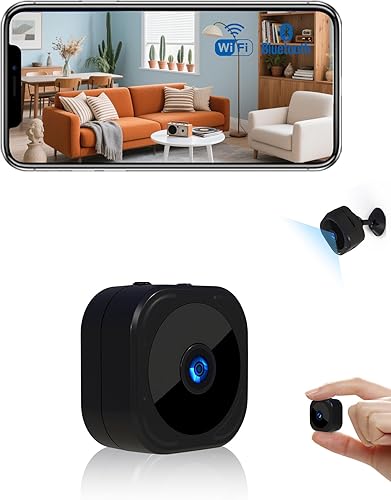 |  |  |  |  |
|---|---|---|---|---|---|---|---|---|---|---|
| Product | Indoor Wireless Portable Camera | LIWAN 4G LTE Camera | 2025 Upgraded Mini Camera | 4K Mini Nanny Cam | Magnetic 2K Security Camera | AOBOCAM Mini Security Camera | Mini Offline Security Camera | No WiFi Mini Camera | 4MP Battery Powered Camera | Mini Portable Camera |
| Brand | SEHMUA | LIWAN | Funstorm | AMZCEV | Thybro | AOBOCAM | UCOCARE | ehomful | Civolox | ASZZCHT |
| Best for | Best Overall | Runner-Up | Best for Long Standby | Best for Fast Setup | Best for Magnetic Mounts | Best for Cloud Storage | Best for Offline Use | Best for Small Spaces | Best for Room Coverage | Best for SD Recording |
| The listing says | Wire-free installation without drilling Long-lasting battery for weeks of monitoring | 4G LTE connectivity with SIM card Rechargeable battery with 700–800 clips capacity | 4K UHD resolution with 100 days standby 110° wide-angle lens for large areas | Magnetic mounting with compact design 1200mAh battery with 60 days standby | Magnetic mount with 12KG pull force Stable streaming up to 1200 sq.ft | Wi-Fi and Bluetooth dual connection 1080P resolution with 120° wide-angle lens | Works with Wi-Fi, AP, or offline 4K Ultra HD with night vision | 1 inch alloy casing with 120° lens 1080P@30fps video with date stamp | Wire-free with rechargeable battery 360° PTZ view for room coverage | 1.9×1.5×0.7 in size with 1080P resolution Motion detection and recording while charging |
| More information | Buy on Amazon | Buy on Amazon | Buy on Amazon | Buy on Amazon | Buy on Amazon | Buy on Amazon | Buy on Amazon | Buy on Amazon | Buy on Amazon | Buy on Amazon |
1. Indoor Wireless Portable Camera
Best for: Renters and travelers wanting easy, wire-free monitoring.
This camera stands out because it uses dual-band Wi-Fi, which helps maintain a stable connection even in busy environments. The wire-free design allows you to set it on a desk or shelf without needing to drill holes or manage messy cables. It’s ready for use in seconds, making it ideal for moving from room to room.
The AI human detection is a helpful feature, as it filters out movement from pets, shadows, or swaying curtains. This means you only get notified if a person is actually in the room. If you’re monitoring a hallway or stairwell, this filtering prevents over 99% of false triggers.
This device isn’t for users who need 24/7 continuous power without access to a charging cable, as it relies on its internal battery. While it supports weeks of monitoring on a single charge, the actual runtime depends on your specific trigger frequency. If you notice the battery draining quickly, check if the camera is facing a high-traffic area.
Pros
- Stable 2.4 GHz and 5 GHz dual-band Wi-Fi connectivity
- AI human detection reduces false alerts
- Portable design requires no drilling or wiring
Cons
- Memory card (up to 128GB) not included
- Battery life depends on usage frequency
- Requires occasional recharging based on activity levels
2. LIWAN 4G LTE Cellular Security Camera Indoor Wireless
Best for: Travelers staying in locations without reliable Wi-Fi.
This camera is unique because it connects via a 4G LTE network, bypassing the need for hotel Wi-Fi entirely. It features 355-degree pan and 90-degree tilt rotation, giving you a full view of your temporary space from your phone.
The rechargeable battery is rated for 700–800 video clips, which is ideal for short-term stays where you might not want to charge it daily. If you need a full recharge, expect to wait 6–8 hours using a 5V/2A adapter.
It isn’t for users who don’t want to manage a cellular data plan, as the camera requires one for remote features after the included data period ends. If you see a notification for a false alert, check your PIR sensor settings; the AI human detection is designed to ignore pets and moving objects.
For the best results, install a memory card up to 128 GB to store your footage locally. If you prefer cloud storage, your clips are kept on AWS-backed servers. Whether you’re in a vacation rental or a campsite, this device offers 2K resolution and color night vision up to 30 feet.
Pros
- Works without any Wi-Fi
- Full 360-degree room coverage
- Includes two-way talk features
Cons
- Requires separate data plan
- Memory card sold separately
3. 2025 Upgraded Mini Camera
Best for: Long-term stays where frequent charging is inconvenient.
This model is built for longevity, boasting a 2600mAh battery that supports 100 days of standby time. It provides 4K resolution, which is helpful if you need to capture fine details in a large hotel room or suite. If you’re monitoring a space with low light, the high-definition lens maintains clarity, though you must ensure your placement accounts for the 110-degree field of view.
The camera is designed to be set up in three simple steps, making it very approachable for those who aren’t tech-savvy. However, remember to provide your own power adapter, as one isn’t included in the package. If you notice the battery draining faster than expected, check that your motion detection settings aren’t triggering frequent, unnecessary alerts.
Pros
- 100-day standby battery
- High 4K resolution output
- Simple three-step app setup
Cons
- Power adapter not included
- Limited to 110-degree field
If you need to store footage, use the free cloud storage trial included with the device to save your clips. Reach out to the 24/7 customer service team if you encounter connectivity issues during your initial setup.
4. 4K Mini Indoor Security Camera Wirless Nanny Cam with 60-Days
Best for: Travelers who prioritize image clarity and fast setup.
This camera is 80% smaller than standard security cameras, making it very easy to tuck away in a suitcase. It uses Bluetooth Smart-link technology, which allows for a quick connection to both 2.4GHz and 5GHz Wi-Fi networks. This setup method is 90% more stable than traditional hotspot methods, preventing dropouts during critical moments.
The magnetic mount is a major convenience, letting you stick the device to metal surfaces without tools. If you’re renting a space, this no-drill installation allows for seamless, temporary security.
It isn’t for users who need long-duration continuous recording. While the 1200mAh battery supports 60 days of standby in Power-save Mode, the active recording limit is only 8 hours. If you need 24/7 coverage, ensure you have a power source nearby for the USB-C port.
Pros
- Very small and compact
- Bluetooth-assisted fast setup
- Versatile magnetic mounting system
- Dual-band Wi-Fi support
Cons
- Short continuous recording time
- SD card not included
- Requires 3-4 hours for a full charge
5. Magnetic 2K Security Camera
Best for: Users who want the fastest possible installation.
The magnetic base is the highlight here, offering a 12KG pull force that grips iron or metal surfaces securely. It’s ideal for travelers who move between rooms often, as you can snap it into place and remove it in seconds without leaving a mark. If you’re mounting on a vibrating garage door, the magnet is designed to remain stable.
The optimized antenna maintains a clear signal in areas up to 1200 sq. ft. If you experience lag or drop-offs, simply reposition the camera to a new metal surface to find better reception. This camera isn’t for users who need a device that can pan or tilt, as the position is fixed once you mount it.
Most users achieve a successful setup on the first attempt. If you find the connection dropping, check that the device is within the 1200 sq. ft. range of your router. While the battery lasts 30 days, a 2-hour fast charge restores full power.
Pros
- 12KG magnetic mount strength
- 10-second Wi-Fi connection
- Stable signal up to 1200 sq. ft.
Cons
- Fixed viewing angle
- No built-in pan/tilt
6. AOBOCAM Mini Security Camera 1080P WiFi Rechargeable
Best for: Users who want a balance of size and functionality.
This palm-sized camera uses both Bluetooth and Wi-Fi to pair with your network, which solves the common frustration of complex setup processes. By using both methods, the camera achieves network pairing in just 10 seconds. It supports loop recording, so it will automatically overwrite old footage if your memory card gets full.
You should use a card between 8GB and 256GB to ensure continuous coverage. If your home network is unstable, the camera functions without Wi-Fi by saving footage directly to the inserted SD card.
It can be used while plugged into a power source, which is ideal for round-the-clock observation. If you don’t have a permanent power outlet nearby, the built-in battery allows for portable use. It isn’t for users who need built-in 4K resolution, as this model caps at 1080P.
Pros
- Bluetooth and Wi-Fi pairing
- Supports large SD cards
- Compact palm-sized design
Cons
- Lower resolution than others
- SD card not included
7. Mini Offline Security Camera
Best for: Maximum privacy through offline recording.
If you don’t want your footage sent to the cloud, this camera offers an offline mode that records directly to a memory card. It’s a great choice for travelers who are wary of public Wi-Fi security.
The magnetic base and adhesive mounting options provide great flexibility for placing it on shelves or cabinets. Use the AP hotspot mode if you need to view footage locally without an internet connection. If you require remote access, you must switch to the standard Wi-Fi mode.
It isn’t for users who need to check in on their room from across the country while using the offline setting, as this requires you to be physically near the device to retrieve footage. Relying solely on the 1400mAh battery limits your runtime to 7 hours. If you need longer coverage, ensure you’re near a power source, as motion detection and high-sensitivity settings will drain the battery faster than the stated maximum.
Pros
- True offline recording mode
- Flexible mounting options
- Compact and lightweight
Cons
- Limited 7-hour battery life
- No remote viewing in offline mode
- microSD card not included
8. No WiFi Mini Camera
Best for: Discreet, simple, and button-operated recording.
This cube camera is just 1 inch in size and uses a simple two-button interface. It’s excellent for people who want to avoid apps and accounts entirely, as it functions as a standalone recording device. Because it requires no WiFi, you can place it in a vehicle, office, or home without worrying about network security or complex setups.
The alloy casing makes it feel sturdy for travel. If you need to monitor a space continuously, keep the device plugged into a power source for uninterrupted recording. Otherwise, the built-in battery provides 90 minutes of cord-free use. It isn’t for users who want real-time notifications on their smartphone, as this device doesn’t connect to the internet.
When choosing between modes, use the motion detection setting to save storage space on your micro SD card. If you need to capture a specific event, manual mode ensures nothing is missed. Always check that your card is formatted correctly, as the device supports up to 128GB for loop recording.
9. 4MP Indoor Security Camera Wireless Battery Powered
Best for: Users who want a full-featured, high-resolution monitor.
This camera offers 2.5K resolution and a 360-degree pan and tilt view, perfect for covering an entire room. The built-in 3D noise reduction for the two-way audio ensures your voice comes through clearly when you need to soothe pets or talk to family. If you hear background hums, the noise reduction is working to isolate your voice.
It features a 6000mAh battery, providing a long runtime between charges. Because it is 100% wire-free, you can move it between rooms without drilling or finding an outlet. This makes it ideal for rentals or temporary monitoring.
It isn’t for travelers who want to avoid the bulk of a larger camera. Its pan-and-tilt motor makes it heavier than static mini-cube models. If you prioritize extreme portability, you may find the footprint too large for a carry-on.
Pros
- High 2.5K resolution
- Full pan and tilt control
- Large 6000mAh battery capacity
- Dual-band WiFi and Bluetooth quick setup
Cons
- Larger, bulkier design due to PTZ motor
- SD card not included in the box
- Requires manual charging of the internal battery
10. Mini Portable Camera
Best for: Simple, offline surveillance on a budget.
This tiny camera is ideal for those who want to record video without dealing with Wi-Fi or complex apps. It features a gravity sensor that automatically adjusts the image orientation, so your video is always the right way up even if the device is flipped.
The loop recording feature ensures you don’t lose data when the SD card fills up, as it automatically overwrites the earliest files. If you need to monitor a space for longer than the 3.5-hour battery limit, simply connect the camera to a power source to enable continuous, non-stop recording.
This device isn’t for users who require remote monitoring or cloud alerts, as it operates entirely offline. Because it stores data locally on a micro SD card, your footage remains private and inaccessible to third parties. Use motion detection mode to save storage space by recording only when movement occurs. If you need to monitor an area in total darkness, the infrared LEDs provide clear images within a 3-meter range.
Pros
- Gravity sensor for orientation
- No Wi-Fi or app needed
- Records while charging
Cons
- 3.5-hour battery limit
- Basic 1080P resolution
How to Choose the Best Portable Hotel Security Camera
Does the camera need to work without Wi-Fi?
If you’re worried about the security of hotel Wi-Fi, look for cameras that offer an “offline” or “no-Wi-Fi” mode, such as the Mini Offline Security Camera or the No WiFi Mini Camera. These devices record directly to an SD card. This ensures that your private footage is never transmitted over a public network, which is a major benefit for privacy-conscious travelers. Always confirm that the camera supports a high-capacity SD card if you plan to record long hours of footage, as you’ll need to manually retrieve the card to view the files on a computer.
How much battery life is enough for travel?
Battery life is critical when you can’t guarantee access to a wall outlet near your preferred camera angle. For short weekend trips, a model like the 4K Mini Nanny Cam will suffice. However, if you’re planning an extended stay, look for cameras like the 2025 Upgraded Mini Camera, which boasts a standby time lasting over three months. Always check if the camera can record while plugged into a power bank or a wall adapter, as this allows for constant, day-and-night monitoring. The Federal Trade Commission provides guidance on securing home and travel networks, which is useful when setting up these devices.
What resolution and angle do I need?
Resolution and field of view determine how much detail you can see in your room. If you need to monitor a large space, choose a model with pan-and-tilt features, like the 4MP Battery Powered Camera. For small, specific areas like a doorway or desk, a compact 1080P or 2K camera is usually sufficient. Keep in mind that higher resolutions like 4K will fill up your SD card much faster than 1080P. If you choose a 4K camera, ensure you have a large-capacity SD card to avoid overwriting your footage too quickly.
The Indoor Wireless Portable Camera remains the top pick for its reliable dual-band connectivity and AI detection, which makes it perfect for most hotel settings. If you prefer a device that functions entirely offline for maximum privacy, the Mini Offline Security Camera is a solid alternative. Before you leave, make sure you have a compatible high-capacity SD card and a portable power bank, as these accessories will ensure your chosen camera remains functional regardless of the room’s outlet layout or Wi-Fi quality.
Frequently Asked Questions
What should I do if the camera loses its connection?
Most cameras continue recording to an inserted SD card if the Wi-Fi connection drops. Ensure your SD card is properly formatted and inserted before your trip to prevent gaps in footage. Note that non-Wi-Fi models require periodic checks to ensure they remain powered on.
How do I manage the data on my SD card?
Modern cameras use loop recording to automatically overwrite the oldest files once the SD card reaches capacity. For the 2025 Upgraded Mini Camera, this process is automatic once configured. Offline cameras require manual file archiving via a card reader before the card begins overwriting data.
What is the most common reason these cameras fail?
Battery depletion is the most common issue, as active recording consumes power much faster than standby mode. Test your camera’s battery life at home before your trip. Keep a dedicated charging cable and power adapter in your bag, as some manufacturers like Funstorm do not include the adapter.
Is the simplest camera on this list enough for me?
An offline camera is sufficient if you only need a record of events while you are away. This avoids the complexities of app setup and Wi-Fi pairing. However, you must choose a Wi-Fi-enabled model if you require real-time alerts on your phone when someone enters your room.
Conclusion
Before you head out on your next trip, take a moment to test your chosen device at home. You’ll feel much more relaxed once you’ve practiced the setup in a familiar space. It’s a simple way to make sure you’re truly ready to enjoy your time away with complete peace of mind.